
How to Completely Delete a Telegram Account: A Complete Guide
Telegram is the most popular messaging app in Ukraine (according to a USAID-Internews study), used for work, education, business, communicating with loved ones, and reading the news. But despite all the benefits, many people decide to permanently delete their accounts every day. The main problem is that the app doesn't have a direct "Delete Account" button in the settings, which distinguishes Telegram from other messaging apps.
Why do people delete their Telegram accounts?
The decision is usually not spontaneous. Here are the three most common reasons:
- Moving to other platforms
- Changing accounts
- Privacy
Preparing for deletion
Deleting an account is irreversible. Before doing this, be sure to:
- Save important data – download files, photos, videos, and messages to your smartphone or PC.
- Notify your contacts – notify your friends, family, and colleagues about the deletion.
- Check your connection – make sure Telegram is not connected to other services or devices.
Step-by-step deletion instructions.
Due to the mobile app (iPhone/Android).
Step 1:
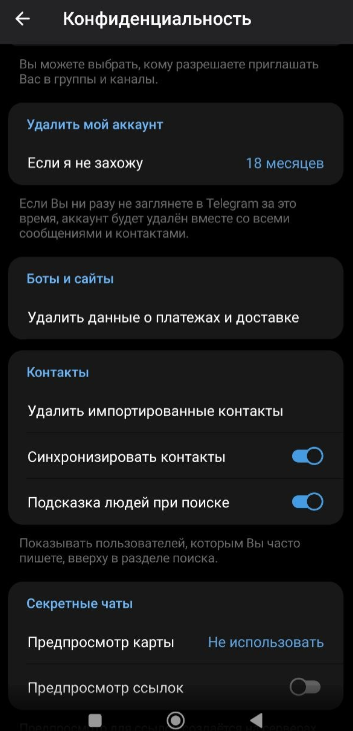
Open Telegram → "Settings" → "Privacy and Security" → scroll down to "If I'm not logged in" → "Delete account now."
Step 2:
Telegram offers alternatives (deleting the chat, limiting visibility). If you're determined, tap "Continue" until the "Delete my account" button appears.
Step 3:
Enter your account's phone number → click "Delete my account" → you'll see a final warning about the inability to restore it.
Via a computer (browser)
Deleting via Telegram Desktop is not possible. Website only:
Step 1:
Go to the deactivation page my.telegram.org → enter the phone number in international format

Step 2:
You will receive a 10-digit code in Telegram chat (not via SMS) → enter the code on the website → "Sign in"
Step 3:
Optionally, specify a reason for deletion → Delete My Account → Yes, delete my account
What happens After deletion?
- Complete data loss
- Wipe from servers
- The username becomes available to other users
- A new account with the same number can only be created after a few hours/days
Automatic deletion after inactivity
Instead of manual deletion, you can set up automatic deletion:
- Settings → "Privacy" → "Delete my account if I don't log in"
- Choose a period: 1, 3, 6 months, or 1 year.
- After change – 6 months of inactivity
Export data before deletion
To avoid losing your correspondence:
- In a chat/group: three dots in the right corner → "Export chat history" → select messages/files/images/videos → "Export"
- Settings: "Export data from Telegram" → select the desired data → the data will be saved in the "Downloaded" folder in Telegram Desktop.
Deleting an account is a serious step. Every user has their own reasons, but it's important to approach this thoughtfully, as the account owner is solely responsible for its contents. Now you have all the information you need to delete it correctly.




It's free and takes 2 minutes. There are 1500+ digital agencies in the catalog that are ready to help in the implementation of your tasks. Choose and save up to 30% on time and budget!