
Step by step how-to guide for App promotion on Google и Facebook
How to start advertising relocate to Poland and comfort living abroad Android/iOS application and what uncommon mistakes to avoid? We will guide you from analytics setup to traffic boost and retention activities for app promo that applicable to every niche.
Client’s application workport.pl allows to search for a job in Poland, buy train or bus tickets, but insurance, find a place to rent, and achieve other benefits while living and working in Poland. Nice USP, good product. Let’s stay the promotion.
On the beginning we need apps themselves uploaded and reviewed on Google Play and App Store. After that we need to setup all analytics through funnel and conversion tracking on app events.
To choose tracking tool we need to think and decide which advertising channels we would start using.
There are some best app tracking tools like Adjust и AppsFlyer but they are not free and are more suitable when you advertise the app with affiliates many tier2 ad networks and so on. As we were focused on Google, Facebook и Apple Search Ads, that generate 80% of all white traffic, we decided that Firebase and Facebook Ads SDK will be enough for our needs.
To track installs and app events you need to configure your app in Firebase and add it’s code into the app. In the first week, we forgot to enter the application ID from the App Store after publishing an app and could not understand why Firebase does not work)
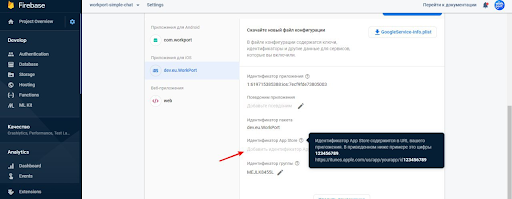
Firebase iOS app setup
Then, by chance, we went into the settings again and found what the problem was. We added the application ID from the App Store and it started working, the data began to be transferred to Firebase.
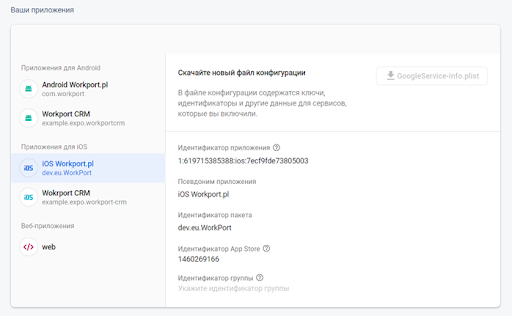
Firebase app ID setup
After adding the code to the application and setting up sending events to Firebase, we will be able to import conversions from Firebase directly into Google Ads on both Android and iOS platforms. To do this, we will need to associate a Google Ads account with Firebase and import conversions, as it’s usually is while importing conversions from Google Analytics.
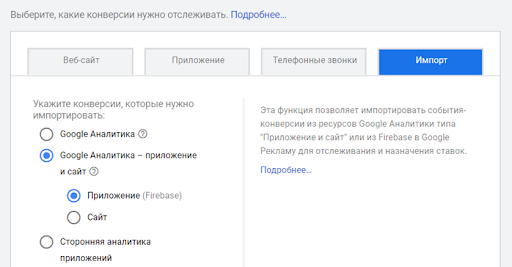
Firebase to Google conversions import
To advertise applications on Google, there is a special type of advertising campaign with an optimization of the budget for getting maximum app installs.
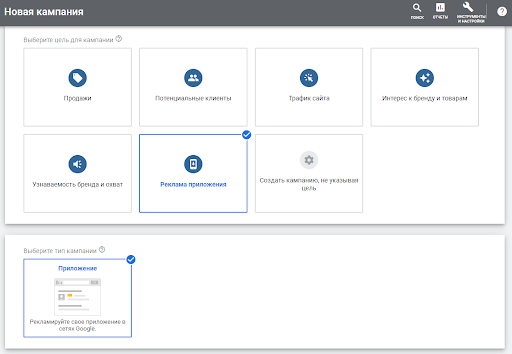
Google App Campaign Setup
In it, targeting is almost all automatic, as Google says based on machine learning, so the main tasks at startup are:
- Passing the maximum number of conversions, (flags for machine learning) for Google to understand how and which people interact better with the application and to reconfigure its targeting;
- High-quality creatives, we will need texts and banners of special sizes for this type of campaign (the most popular according to the recommendations of Google 1200x628, 320x50, 250x250).
We also want to talk about video ads separately, as it’s an excellent ad format for advertising an application. Our advice, take the time to create your YouTube channel, get it well filled with information, make a description and make at least one video that describes the features of your application. This may not be a professional shooting, but an animation showing the actions inside the application. Video works well in this type of campaign as a performance ad type, and as a bonus you get extra. views of videos on your channel and get some subscribers.

Video ad example for UAC
We have added keywords in the channel settings. Linked channel with Google Ads and Google Analytics to import channel metrics into the advertising panel.

YouTube channel ASO
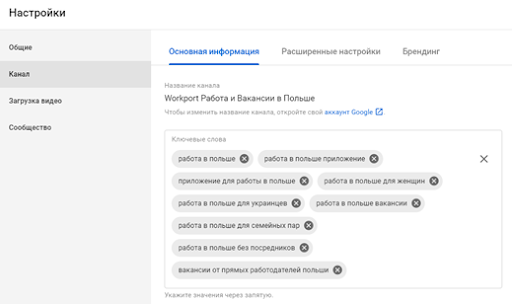
YouTube Channel Keywords
Google. Run a campaign with a small budget and keep an eye on it very carefully in the early days so you don’t spend too much. After 1–2 days when you enter the campaign settings, you can see how the target price for the installation you set affects the budget and the number of installations.
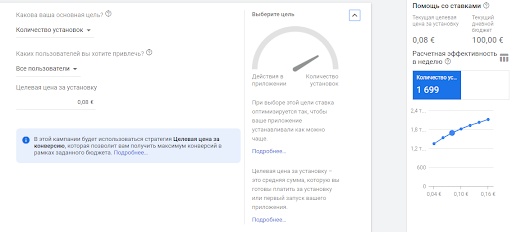
Google Universal App Campaign Goal CPA setup
Now Google in the universal app campaigns itself automatically selects placements and keywords, and if we want to manually add keywords in addition or choose viber for example as a placement, you will need to make a standard campaign with a link to the site, and add an ad extension to it with links to app stores or use smart universal link from Firebase, for example. A user seeing an ad in the search will see the ad text a link to the site and a link to the application store and in the viber they see a banner with a link to the site.
Google app campaigns unfortunately do not allow you to manually select keywords to display ads.
But we wanted to try advertising on the top search request [work in Poland]. Therefore, we suggested making standard search campaigns, manually setting keywords and advertising the site, and from it tracking conversions to application stores. We set up analytics and events on the site, we’d like to monitor.
Similarly, they suggested making a separate banner ad campaigns with a link to the site and choosing Viber as the location, since most have this application installed and it is often used for calls to relatives from abroad.
Advertising website on mobile devices was launched targeting desktop. We understood that we would not track conversions between application installs and website visits from a computer. We decided on the site then to place a QR code on the first screen and track the number of QR scans.

Google Search & Display campaigns
We started search ads for query job in Poland and ads on Viber — for both campaigns, unfortunately, conversion rate from impression to store apps visits was low and the cost of store visit was 2–4 euros. We decided to leave them running, but with a minimum budget.
For the first week on Facebook we spent 114 euros. got 2020 clicks on the application page on Google Play and 222 clicks on the App Store. The average CPC was 0.05 euros.
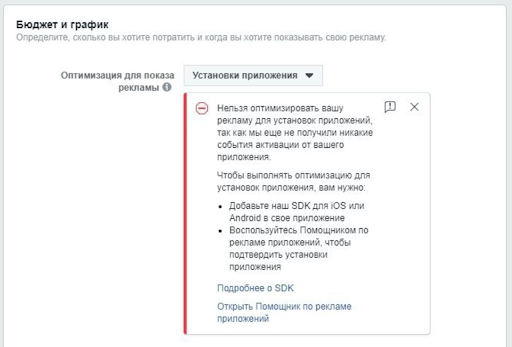
Facebook Ad Optimization options
Since the Facebook SDK was not installed, Firebase tracks Facebook traffic as (direct) and it is impossible to calculate the exact number of installations.
In order to see the conversions in the Facebook advertising dashboard, we need to install their SDK since Facebook is not friend of Google and conversions import from Firebase cannot be directly configured on Facebook. We will need to create and configure:
- Business Account on Facebook;
- Ad account;
- Business page;
- and most importantly, a Facebook app to advertise our Android / iOS apps.
In order to make the basic setup of the application on Facebook, you need to set its parameters and add a link to the privacy policy (it can be both on the site or simply in google docs). You can use the free Firebase generator to create a privacy policy text:
App Privacy Policy Generator
Provide the required information [Please read the disclaimer before using this project] Include links to privacy policy…
app-privacy-policy-generator.firebaseapp.com
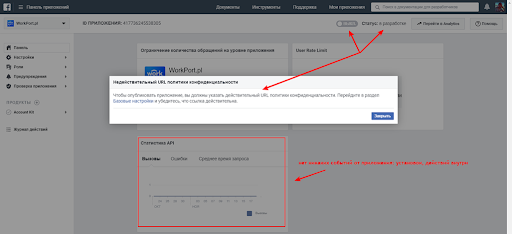
Facebook App Account Setup
Next, you need to install the Facebook SDK into the application. Here you will need some help of your app developers.
Application Installation events must be imported from your application to Facebook. Using this data, you can track and measure the app installs, as well as optimize campaign budget to get the maximum number of installations.

Facebook API requests
In order to integrate the Facebook SDK into the application, you can use this instruction:
https://developers.facebook.com/docs/app-ads/sdk-setup
When we installed the SDK, we can immediately start a special type of campaigns on Facebook to App Install Campaigns, seeing the number of installations and optimize the budget for their max. amount.
We will also have access to the Facebook Analytics audience analysis tool now.
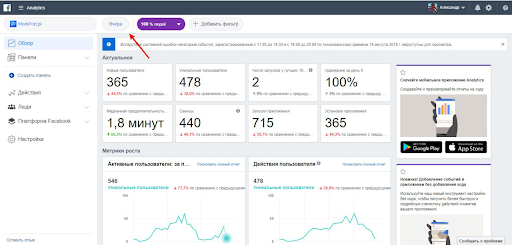
Facebook Analytics Events
It is quite powerful tools that allows you to analyze all the most active users of the application by demography, interests, etc.

Facebook Analytics Demographic reports
Campaigns results:
- Google — started with 619 installs per week € 0.35 CPI and then with all optimization in our best week we received 10255 installations at € 0.20 CPI.
- Facebook — without SDK, according to indirect estimates from Firebase, we started with 900 installations per week at € 0.66 CPI but then when we set up tracking for maximum results we got 2210 installations per week at € 0.24 CPI.
Next, we began to analyze our application audience, traffic quality and user retention. You need to be prepared that with the increase in the number of installs, the churn rate and number of people who opened the application a couple of times and deleted it will also increase.
Only 40% of people installed the application then don’t remove it after a day and this is generally considered the average retention rate for all applications market.
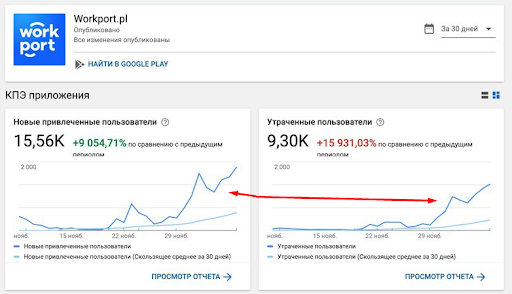
Firebase New users vs. Churn rate
We started to look in sections of audience analytics. Firebase didn’t show anything interesting if we compare everyone who installed the application and who actively uses it.
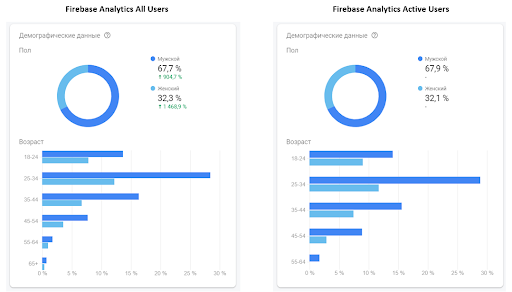
Firebase All app users vs. Most active users
At the same time, Facebook Analytics based on the data of the most active 10% of users showed that the most active are users aged 25–54 years and men are a little more active.
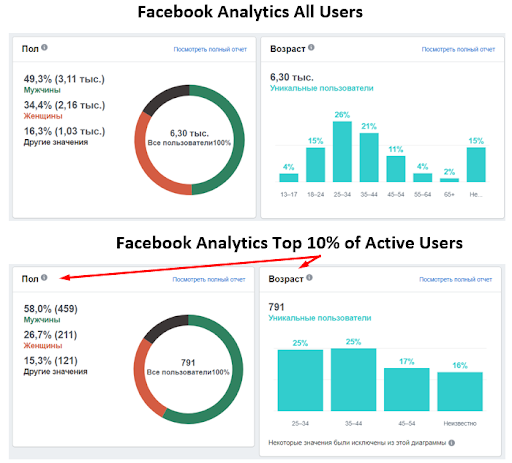
Facebook analytics insights based on All users vs. Most active users
Therefore, we decided to exclude people under the age of 25 and over 54 from the targeting and began to monitor reports on user retention on Facebook.
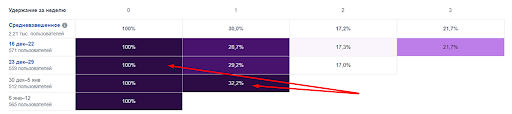
Facebook Retention report
There are similar retention reports in Firebase also.
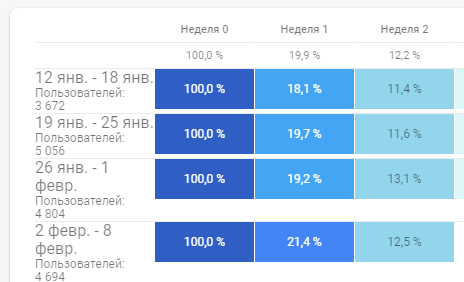
Firebase retention report
In addition to analyzing demographics and interests, you can always do a survey among users of your applications to understand the reasons for uninstalling the application and hear their comments. You can make a list of questions in Google forms and send push notifications or emails.
When the user base is large enough, you can set up retention mailings and push notifications, for example, send a welcome message for 1 day, send a special offer to those who have not used the application for a week, etc.
You can also optimize advertising campaigns not by settings, but by targeted actions within the application, if we configure events within the application that we consider target for us. The basic conversion actions are:
- Registration, complete personal profile data;
- Authorization inside the application via Google, Facebook account or via SMS;
- Opening the application 24 hours after installation (1day retention);
- Purchases within the application, account refill.
For ourselves, we identified such a targeted action as sign-up and decided to launch new advertising campaigns with optimization not for the number of installations but for users who are more likely to perform the needed action after installation.
In the case of Google, everything is a little simpler, the developer must configure the event in Firebase, then we transfer this event to Google and select the new campaign settings.
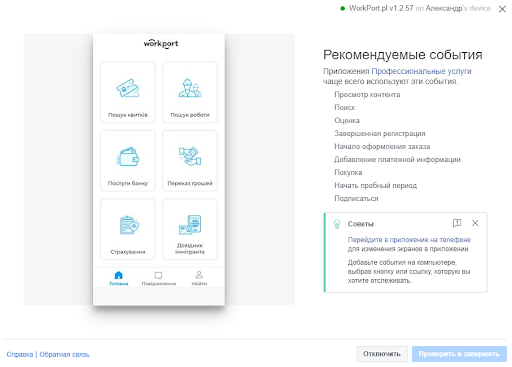
Google Campaign Goal setup
In the case of Facebook, things are a little more complicated. Along with the installation of the Facebook SDK, all events are automatically transferred to Facebook, however we cannot use these events to optimize advertising. In order to optimize advertising for events, you need to install an additional Facebook tracking code and choose the name of one of the “standard” conversions that Facebook understands.
We tried without the help of developers to configure sign-up tracking through the Facebook configuration tool, but the application began to crash with this option for event tracking.
Facebook Auto Conversion Events Tracking Tool with UX
There are three types of conversions on Facebook:
- auto conversions, when FB based on actions and pieces of code, considers a certain action as conversion;
- standard conversions from the FB list for each niche;
- special conversions that are set manually and which are not in the standard list.
Strange, but there is no way to set auto and special conversions as campaign goal for optimization, you can only set it as a goal by choosing a “standard” conversion from the list.
Help on conversions in the app you definitely need to read:
Optimizing Your App Ad - Facebook App Ads - Documentation - Facebook for Developers
When picking your bid type, you can choose to have your campaign optimize for installs by selecting App Installs as…
developers.facebook.com
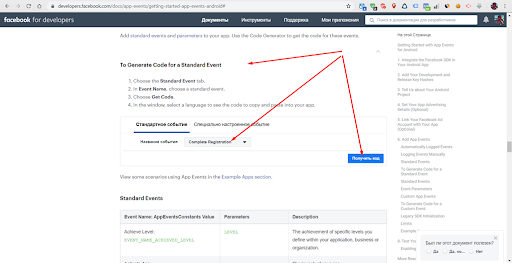
Facebook Standard Events for Ad campaigns optimization
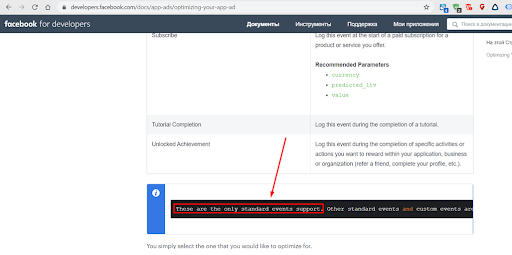
In order to create a standard conversion in the application, there are 2 options: manually specify in the application which buttons this conversion is or with the help of developers add a piece of code when the conversion is triggered. So far, we have manually set sign-up as the standard conversion “completed registration” when we clicked on the Create an account button in the application, and launched campaigns with optimization for this action, but Leonid (thanks to him a lot) let us know that with such tracking the bug got out and applications sometimes starts to freeze and we turned off such tracking. Therefore, we still offer to add a piece of FB code when a sign-up is triggered, so that it tracks all sign-ups with a guarantee.
Help on the name of standard Facebook conversion events:
https://developers.facebook.com/docs/app-events/getting-started-app-events-android#event-names

Facebook Event Code for adding into your app to track conversions
Next, to transfer the conversion, you need to generate the necessary code and add its working at the desired event in the application. If everything is done correctly then in the setup of the ad group on Facebook you will see such an option for optimization.
Now you can choose this event as conversion optimization goal
Now, after all the settings being done, we could analyze firstly the cost per install by ad channels, but then weekly we could finally analyze the cost of retention of attracted users according to the retention reports in Facebook Analytics and Firebase Analytics and calculate such a metric as the cost for one user who continued to use the application after a week, cost per 1 week retained user.
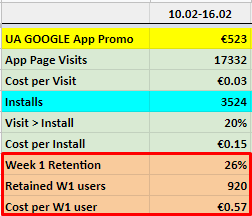
Cost per retention stats
When we saw that retention is better on Facebook, we allocated a larger budget, despite the higher installation cost, to get the maximum of Retained W1 users (users who opened the application in a week) on both platforms, and consider the installation cost as a secondary metric.
On the basis of 1 week retention data, we adjusted bids by Facebook / Google and within campaigns inside. We strive for get minimum cost for 1 user who opened the application in a week for all campaigns and platforms to be the same.
Sign-up conversion is good for optimization, but there are users who regularly use the application but do not create an account, since not all actions require it. Therefore, we proposed to configure the conversion as launching the application after 24 hours i.e. Day 1 retention to optimize Google / Facebook ads for such a conversion. Sign-up yes, these are the most desirable users, but those who do not delete the application and use it after a day should also be considered interested users.
Now we’re waiting for the developers to configure this conversion and start launching new campaigns.
We also had a problem with ASO. The application was not in SERP in Google Play. We rewrote the description of the application in Google play and the App Store and added the necessary keywords for which we wanted our application to be found.
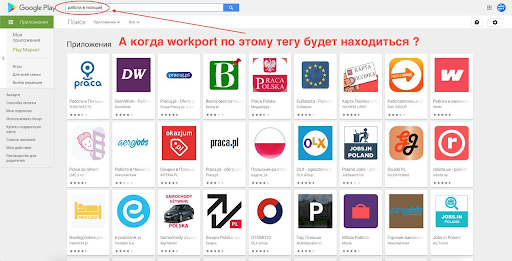
Google Play Search engine results page
We corrected the page description on Google Play and added keywords in the Ukrainian and Russian languages description and app name.

Adding keywords into app name
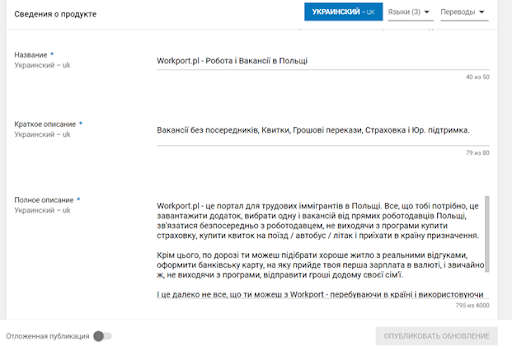
adding keywords into app descriptions
Now the application for queries like work in Poland etc. started appearing in google play results in 5th place and in general Google search results also began to show-up.
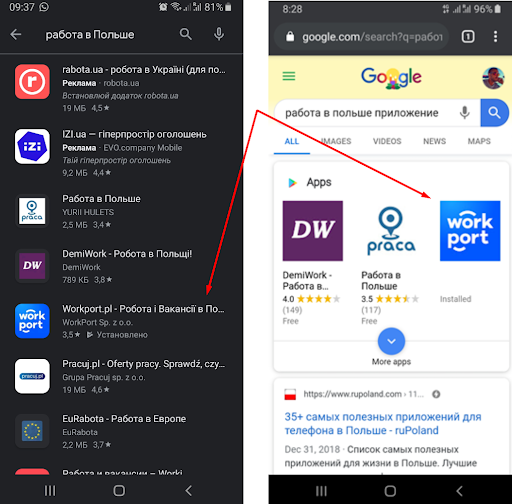
App got up on SERP
We also started a video campaign to increase brand awareness of three types:
- Targeting selected manually YouTube channels;
- Interests based audiences;
- Video sequence, the goal of it is to show a person all three videos in sequence, not immediately of course, but in a day, for example, and then looking at all three videos in turn will create a more holistic view of the brand and features of the application.
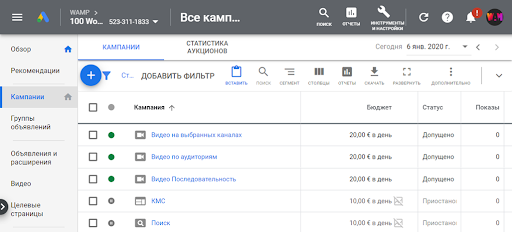
Google Video campaigns types
We created the further 5 interest audiences and started one video campaign on them.

Google audiences created manually and chosen from the list
As a result, 3 types of video campaigns were launched:

Video campaigns types
The video on the selected channels did not give a lot of impressions, but we are sure of the placements, the cost of the conversion is of course very high, this is a purely brand awareness type of campaign, not performance at all.
The sequence of three videos came out a more expensive in CPM, cost of Reach and CPI than regular video campaign with showing one of the videos. The campaigns have similar targeting so we ran the sequence campaign for a couple of days and stopped it.
Video targeting five created audiences had best results in terms of impressions, CPM, CPI and had the lowest cost-per-click among all running video campaigns.
It is important to note that at the same time, the main Android Install campaign was showing our video ads on YouTube as well, and it had the best click through rate CPC, CPI etc. Therefore, we proposed to leave running Video campaign on manually chosen channels, since there we are sure the most in proper audience targeting. Decide to expand the list of such channels and keep in running with a limited budget to 100 euros per week. At the same time, video advertising from the main Android Install campaign will cover other channels, placements and people who, according to their behavioral patterns, are relating to our target audience.
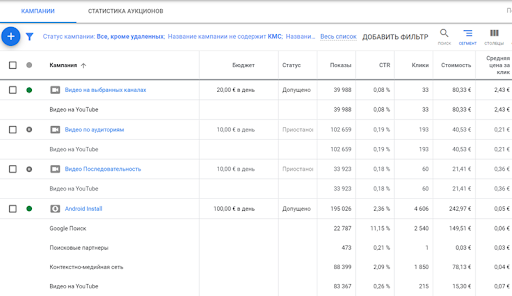
Video campaigns results comparison
As a result, due to the fact that we used the video as an advertising creative, we got 70+ thousands video views, that’s why we can say this type Google UAC also works well for reach and brand awareness.
The only thing to remember is that while advertising short videos such as bumper ads, Youtube will not count video views generated by the advertising campaign in its view counter — YouTube channel counter will show fewer views than the actual ones.
Just after we started advertising,immediately brand queries in the search appeared, a little of course, but still there are. So be ready to receive this traffic, be sure that at least for brand quires your website is on top position in SERP. If it’s not, start a brand campaign in search for your potential clients when searching your brand to be able to find your website.
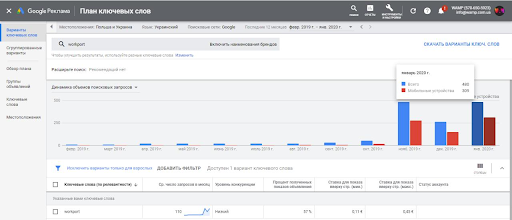
Brand search queries increase since advertising start
Therefore, any proper targeted advertising affects the growth of organic installs, brand queries increase and direct visits of your website if the site address is easy to remember.
You can check also: How to build a website for small business and how much does it cost.



It's free and takes 2 minutes. There are 1500+ digital agencies in the catalog that are ready to help in the implementation of your tasks. Choose and save up to 30% on time and budget!